
Camera Modes
- ib3044
- Mar 6, 2020
- 2 min read
Automatic Mode
This mode gives you good results with many shooting options.With some cameras auto mode lets you override flash or change it to red eye reduction. As a result some of the following modes might be more appropriate to select as they give you camera a few more hints.
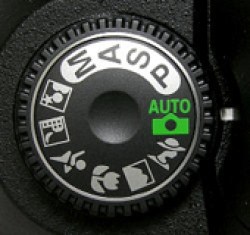
Portrait Mode
It works best when you're photographing a single subject. If you're shooting into the sun you might want to trigger your flash to add a little light onto their face. It will automatically select a large aperture.
Macro Mode
When you use macro mode you'll notice that focusing is more difficult as at short distances the depth of field is very narrow. Keep your camera and the object you're photographing parallel if possible or you'll find a lot of it will be out of focus. If you move away from your subject it can sightly make your subject out of focus.
Landscape Mode
Landscape mode is basically the opposite of portrait mode. It's therefore perfect for getting shots of wide scenes. Your camera might select a slower shutter speed so you might want to use a tripod or other method of ensuring your camera is still.
Sports Mode
Sports Mode is perfect or photographing any moving objects including people playing sports, pets, cars, wildlife etc. When photographing fast moving subjects you can increase your attempt of capturing them with panning of you camera along with the subject and/or by attempting to pre focus your camera on a spot where the subject will be when you want to photograph it. It takes practice!
Night Mode
It's for shooting in low light situations and sets your camera to use a longer shutter speed to help capture details of the background but it also fires off a flash to illuminate the foreground. It's cool to take shots that purposely blur your backgrounds.
Movie Mode
New digital cameras come with movie mode that records both video but also sound. Keep in mind that moving images take up significantly more space on your memory storage than still images.
Aperture Priority Mode
This mode is semi-automatic. It's useful when you're looking to control the depth field in a shot. It means you'll have a bigger depth of field.
Shutter Priority Mode
You basically select a shutter speed and then the camera chooses the rest of the settings. When shooting moving objects you might want to use a fast shutter speed. If you're going to select a waterfall then you might want to choose a slow shutter speed.
Program Mode
Program mode is similar to Auto bit gives you a little more control over some other features. Check your digital camera's manual for how the program mode differs from automatic in your particular model.
Manual Mode
You have full control over your camera. It gives you the flexibility to do whatever you want I guess. You also need to have an idea of what you're doing.
Comments